Back to BlogCase Study

Building Unbuzz: Engineering a Caffeine Tracking App That Actually Works

How we built Unbuzz — a privacy-first caffeine tracking app with real-time decay modeling, Apple Watch support, and on-device intelligence. A technical case study covering Flutter, Supabase, and the architecture decisions that shaped the product.

HLT3.dev Team9 min read

Unbuzz — Track Caffeine. Sleep Better.

That 2 PM espresso is still 50% active in your bloodstream at 7 PM. By midnight, a quarter of it remains — enough to measurably reduce your deep sleep. Most people have no idea. We built Unbuzz to change that.

Unbuzz is a caffeine tracking app that uses pharmacokinetic modeling to show users exactly how caffeine moves through their body. Not a simple drink counter — a real-time simulation of caffeine metabolism, personalized to each user.

This is the story of how we built it: the architecture decisions, the tradeoffs we navigated, and what we learned shipping a health app to production.

The Problem With Existing Caffeine Trackers

Every caffeine app we tested had the same issue: they counted milligrams consumed but ignored the dimension that actually matters — time. Caffeine follows exponential decay in the body, and a 200mg coffee at 8 AM is pharmacologically different from 200mg at 3 PM.

We set out to build something that models caffeine the way your body actually processes it. That single decision — treating caffeine as a time-series problem rather than a daily counter — shaped every technical choice that followed.

Core Features at a Glance

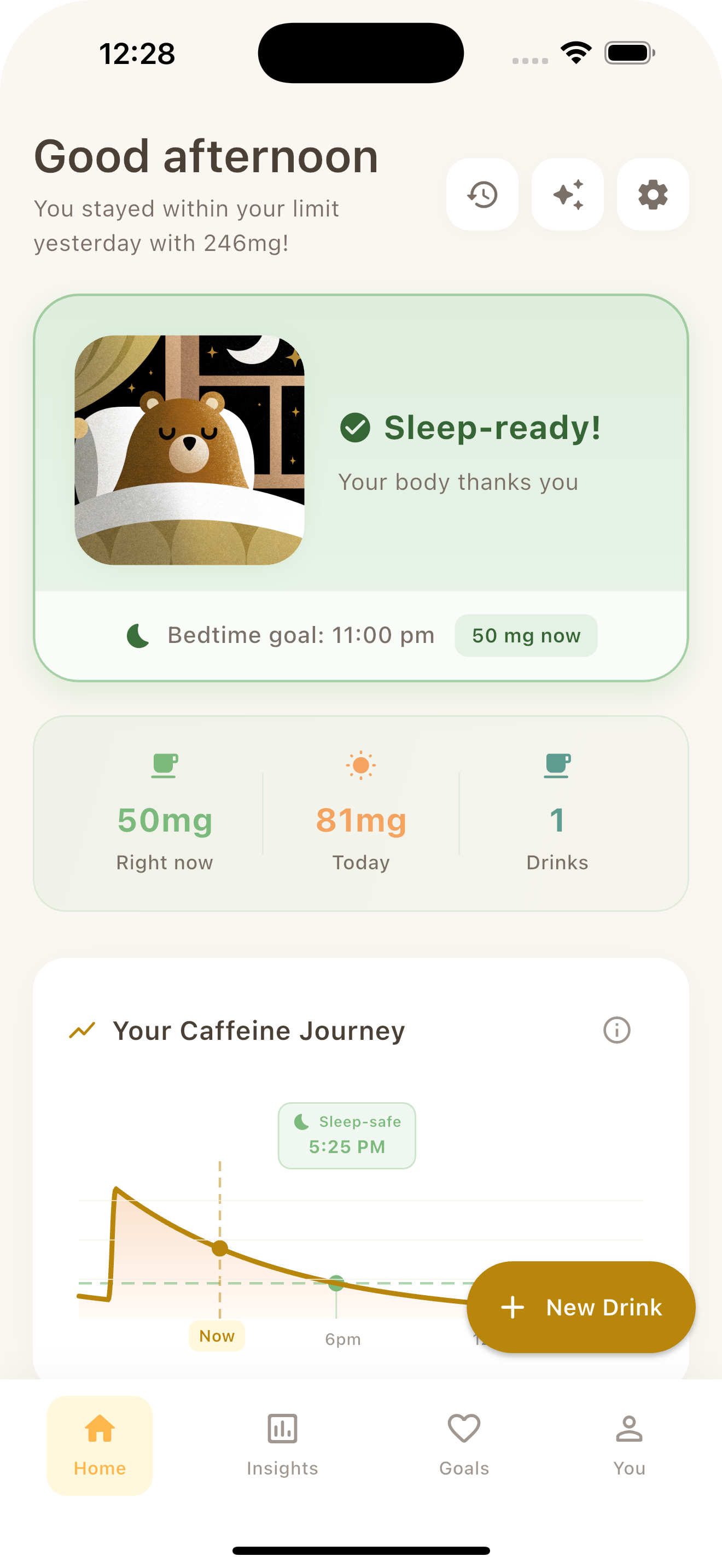
  • Real-time decay visualization — a live curve showing caffeine leaving your system
  • Sleep-readiness predictions — when your caffeine will drop below a sleep-safe threshold
  • Personalized metabolism — adjustable half-life based on genetics, age, and medications
  • One-tap logging with saved presets and barcode scanning via USDA's FoodData Central API
  • Apple Watch companion and home screen widgets
  • HealthKit and Google Fit sync for caffeine and sleep data
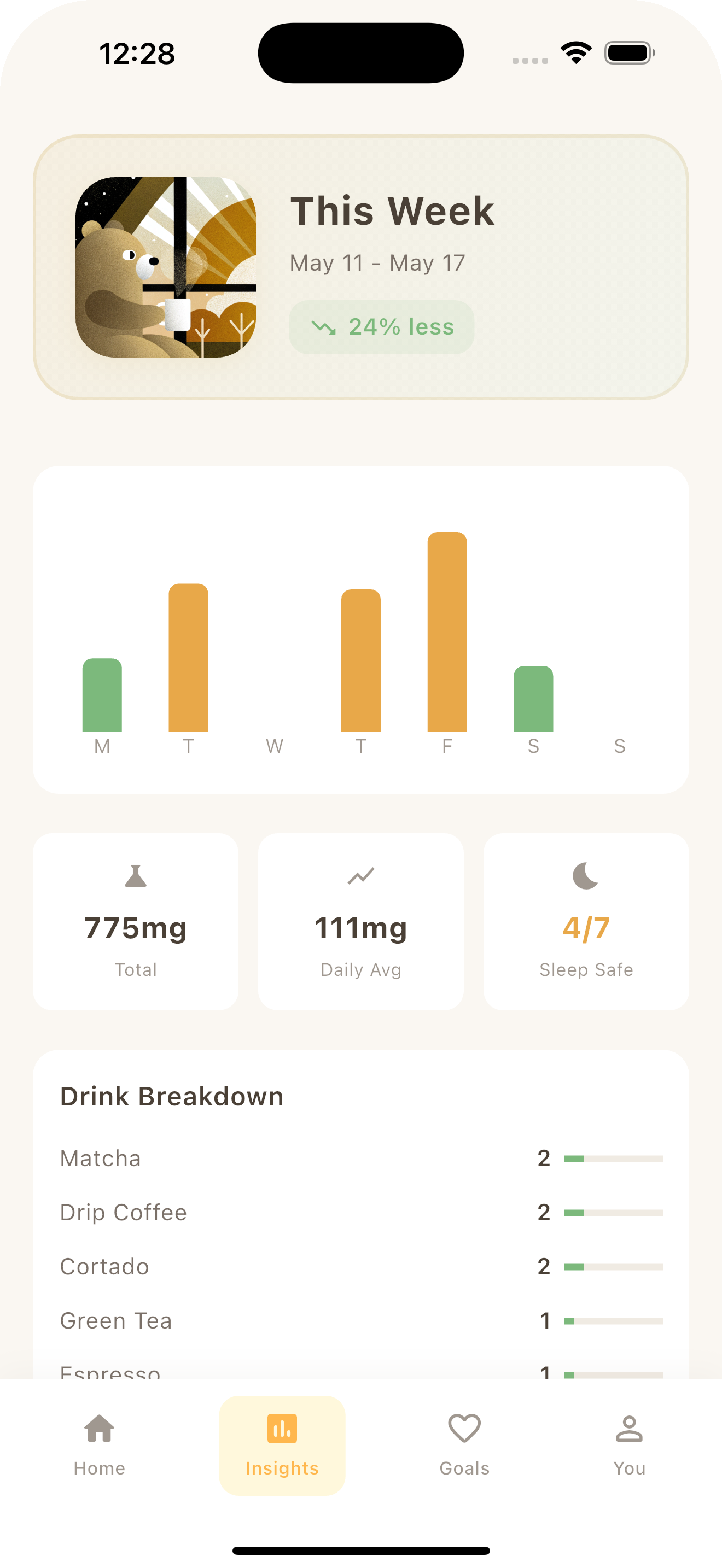
  • On-device pattern detection — insight engine analyzing 30 days of caffeine-sleep correlations
  • Streaks, achievements, and challenges for building better habits

Unbuzz app dashboard showing caffeine decay curve

Choosing Flutter — and Why It Paid Off

We chose Flutter, and it turned out to be the right call for a non-obvious reason. The usual argument is "one codebase, two platforms." That mattered, but what sealed the deal was Flutter's ability to handle deep native integrations without fighting the framework.

Unbuzz isn't a typical CRUD app. It communicates with Apple HealthKit, Google Health Connect, WatchKit for the Apple Watch companion, WidgetKit for iOS home screen and lock screen widgets, WorkManager for Android background tasks, and Siri Shortcuts for voice-activated logging. That's six different platform APIs, each with its own lifecycle and data model.

Flutter's platform channels made this manageable. We wrote native bridges in Swift and Kotlin that communicate with the Dart layer through typed method channels. Each integration — health data, watch connectivity, widget state — is encapsulated in its own bridge class with a clean, narrow interface. The framework never got in the way.

Performance was never an issue. The caffeine decay chart animates at 60fps with no manual optimization. Flutter compiles to native ARM, so the rendering pipeline has no JavaScript bridge bottleneck to work around.

The Code Generation Advantage

We leaned hard into Dart's code generation ecosystem. Freezed for immutable data models, Riverpod codegen for type-safe dependency injection, Drift for compile-time SQL verification, and JSON Serializable for API serialization. This added a build step, but eliminated entire categories of runtime bugs — particularly around null safety and type mismatches in database queries.

State Management: Why Riverpod Over BLoC

We evaluated BLoC, Provider, GetX, and Riverpod. The decision came down to one thing: testability without ceremony.

Riverpod providers have no dependency on BuildContext. That means every piece of business logic — including the caffeine calculation engine — can be unit tested without instantiating a single Flutter widget. For a health app where calculation accuracy is safety-critical, this was non-negotiable.

The reactive model also simplified our data flow considerably. When a user logs a drink, the event propagates automatically: the decay chart updates, the sleep-safe timer recalculates, the streak counter checks for eligibility, and the widget bridge serializes fresh state — all through Riverpod's dependency graph, with no manual wiring.

The Caffeine Engine: Pharmacokinetics on a Phone

The heart of Unbuzz is a pharmacokinetic simulation. The model is straightforward — caffeine follows first-order elimination kinetics:

double remainingCaffeine(double initial, double hours, double halfLife) {
  return initial * pow(0.5, hours / halfLife);
}

The default half-life is 5 hours, but users can tune this based on factors that affect CYP1A2 enzyme activity — the primary metabolic pathway for caffeine. Smoking accelerates it. Oral contraceptives slow it down. Genetics can shift it by ±40%.

The calculation engine aggregates every logged drink, applies the decay function individually, and sums the remaining caffeine at any point in time. The sleep-readiness calculator then projects forward to find when total caffeine drops below a configurable threshold (default: 25mg — roughly the level at which most research shows negligible sleep impact).

Everything runs on-device. No network calls, no cloud dependency. Every chart frame, widget refresh, and Watch complication reads from this local engine.

Local-First Architecture: Privacy as a Feature

We made an early decision that all user data lives on-device by default. This wasn't just a privacy checkbox — it shaped the entire architecture.

The local database uses Drift, a SQLite ORM for Dart that gives us compile-time SQL verification and reactive streams. The schema (currently at version 8) covers drinks, presets, user settings, profiles, daily stats, sleep logs, streaks, achievements, challenges, and tolerance snapshots.

Why This Matters

Three reasons drove the local-first approach:

  1. The app works offline. No loading spinners, no "connection required" screens. Local SQLite queries return in microseconds.

  2. HealthKit compliance. Apple requires that HealthKit data never leaves the device without explicit user consent. Building local-first from day one meant HealthKit integration was straightforward instead of a retrofit.

  3. User trust. Health data is sensitive. People won't track their caffeine habits if they think the data is being sent to a server. Making local-first the default — with cloud sync as an explicit opt-in — removed that friction.

Cloud Sync: Supabase as an Opt-In Layer

For users who want cross-device access, we built an optional sync layer powered by Supabase.

The sync architecture is deliberately simple: local Drift database is always the source of truth. Changes push to Supabase on a debounced schedule, and other devices pull and merge with last-write-wins conflict resolution. We chose last-write-wins over more sophisticated CRDT approaches because caffeine logs are append-heavy and rarely edited — the conflict rate is extremely low in practice.

Why Supabase specifically? Row-Level Security was the main draw. Every database query is scoped to the authenticated user at the PostgreSQL level — there's no application-layer authorization to get wrong. Combined with PKCE-based auth (no secrets stored on device) and SOC 2 compliance, it checked the security boxes for a health-adjacent app.

The sync layer is fully decoupled. Removing Supabase wouldn't break any core functionality — the app would simply stop syncing.

Unbuzz insights showing caffeine patterns

On-Device Intelligence: Insights Without ML

One of Unbuzz's most compelling features is its Insights Engine — and it doesn't use a single machine learning model.

The engine analyzes 30 days of caffeine and sleep data using deterministic algorithms: moving averages, variance analysis, and correlation scoring. It detects patterns like energy crash cycles (high caffeine → gap → another high dose), weekday vs. weekend consumption shifts, morning routine consistency, afternoon slump dependencies, and tolerance trajectories.

The sleep correlation engine deserves a callout. It analyzes the relationship between caffeine timing and sleep quality over a rolling 30-day window, producing a confidence-scored correlation that improves as more data accumulates.

Why not ML? Because the dataset is tiny (one user's 30-day history), the patterns are well-defined, and deterministic algorithms are explainable. When the app tells a user "your afternoon caffeine correlates with 23% worse sleep quality," they can trace exactly how that number was computed. No black box. No "the model says so." This transparency builds trust in a way that ML predictions can't.

Monetization: RevenueCat and the Freemium Model

Unbuzz uses a freemium approach. Free users get core tracking, decay curves, and the sleep-safe calculator. Pro unlocks advanced insights, challenges, withdrawal tracking, and widgets. A lifetime purchase option provides permanent access.

RevenueCat manages the entire subscription lifecycle — receipt validation, entitlement management, cross-platform restores, family sharing, grace periods. Building this on raw StoreKit and Google Play Billing would have added weeks of development for edge cases that RevenueCat handles out of the box.

Unbuzz widgets and Watch app

Apple Watch and Widgets: Meeting Users Where They Are

The Apple Watch app uses WatchConnectivity for real-time sync with the iPhone. Users can view their current caffeine level, log drinks from their wrist, and see complications on their watch face. The bidirectional bridge sends drink logs up and receives caffeine state updates back.

iOS home screen widgets are built with WidgetKit via Flutter's home_widget package, with AppIntents for interactive actions. The widget bridge serializes current caffeine state into a shared container that the native widget extension reads — updated whenever a drink is logged or the decay calculation changes meaningfully.

These surfaces matter because caffeine tracking is a micro-interaction. If logging a coffee requires opening an app, unlocking it, and navigating to the right screen, people won't do it. A Watch complication or widget tap reduces that to one second.

What We Learned

Building Unbuzz reinforced a few principles we keep coming back to:

Local-first is underrated. The upfront investment in offline-capable architecture paid dividends in performance, privacy compliance, and user trust. Bolting on a sync layer later was far easier than trying to retrofit offline support onto a cloud-first app.

Flutter's native bridge is production-grade. Six platform APIs, two operating systems, and the framework never became the bottleneck. Platform channels scale cleanly.

You probably don't need ML. For structured, small-dataset pattern detection, deterministic algorithms are more transparent, more debuggable, and produce equally useful results. Save ML for problems that actually require it.

Supabase is ready for production health apps. Row-Level Security, PKCE auth, and SOC 2 compliance make it a credible backend for apps that handle sensitive data.

Unbuzz dark mode dashboard

Build With Us

We design and build mobile apps that solve real problems — from architecture through App Store launch. If you're working on a health, wellness, or data-driven mobile product, we'd like to hear about it.

Get in touch →

Need Help With Your Project?

We're here to help you build amazing digital products.

Get in Touch